

Want to make your Facebook Stories more engaging? Adding music can enhance your photos and videos, making them more interesting for your audience. In this guide, we’ll walk you through how to add music to Facebook Story using the built-in Music Sticker, as well as other methods for mobile and desktop users. Whether you’re sharing a quick moment or a special memory, this step-by-step guide will help you easily add music to Facebook Story and create more dynamic posts.
How to Add Music to Facebook Story from the Audio Library:
If you’re using Facebook on a desktop, you may notice that the platform only allows you to create text or image posts. Unlike the mobile app, it does not support uploading video or audio files. This means that to add music to a Facebook Story, you will need to use the Facebook app on your mobile device.
Steps to Add Music to a Facebook Story on Mobile:
- Open the Facebook app on your Android or iPhone.
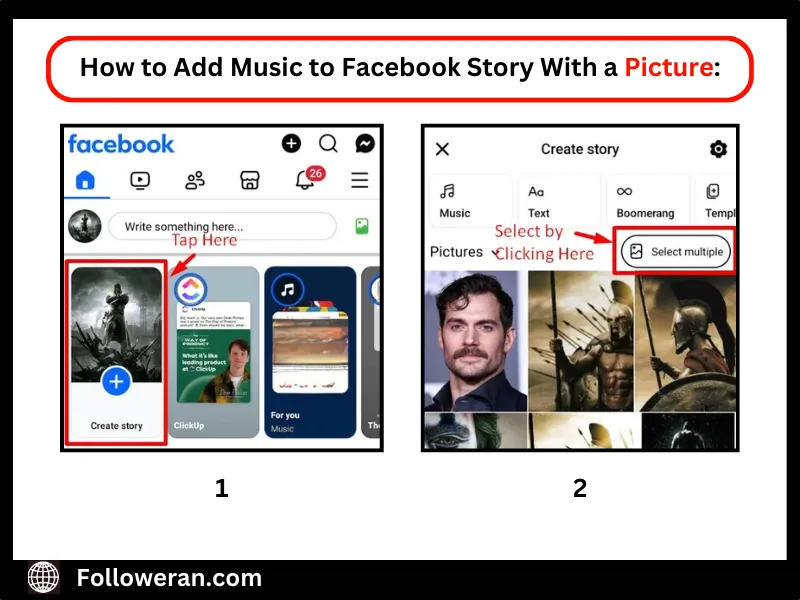
- Tap on Create Story from the homepage.
- Select the Music option to browse through the built-in song library.
- Search for a song and tap on it to choose.
- Adjust the slider to pick the exact 20-second section of the song you want.
- Tap Share, and your Story will be posted with the song and its album artwork.
How to Add Music to Facebook Story With a Picture:
Enhancing your Facebook Story with music is simple using the built-in Music Sticker. This feature allows you to overlay a song from Facebook’s library onto your photo or video Story. Follow these steps to add music effortlessly:
- Step-by-Step Guide to Using the Music Sticker
- Open the Facebook app on your mobile device.
- Tap Create Story at the top of your News Feed.
- Choose a photo or video from your gallery, or capture a new one.
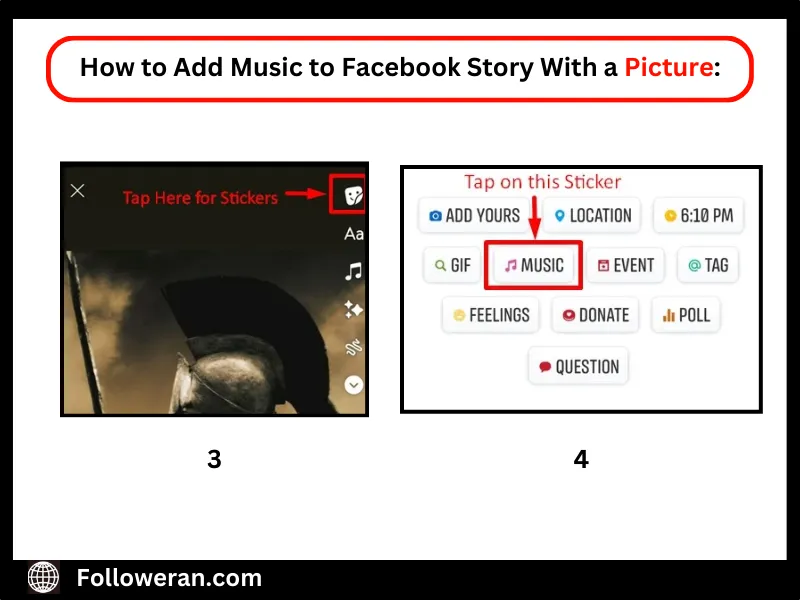
 Tap the Sticker icon (a square smiley face) in the top-right corner.
- Scroll through the stickers and select Music to access Facebook’s song library.
- Search for a song that matches your Story and tap to add it.
- Customize the appearance of lyrics or album artwork on your Story.
 Tap the Sticker icon (a square smiley face) in the top-right corner.
 Search for a song that matches your Story and tap to add it.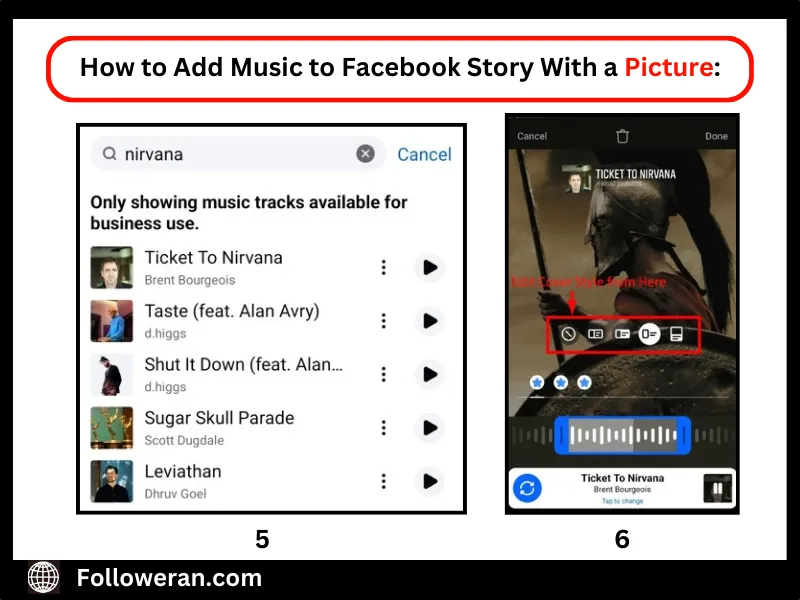
Once you’re happy with the final look, tap Share, and your followers will see your Story with the added music!
Adding music to your Facebook Story is a great way to make it more engaging, but why stop there? To get even more eyes on your content, try boosting your reach with Free Facebook Views and let your stories shine!
How to add music to Facebook story with a video:
To add music to a Facebook story with a video, you’ll need to use the mobile app, as this feature isn’t available on the desktop version. You have two main options: either create a video with embedded audio beforehand or overlay music while uploading your story. Follow these steps to add music directly within Facebook:
- Open the Facebook app and log into your account.
- Tap the Create Story button on your homepage.
- Choose a video or photo from your camera roll, or experiment with multiple images.
- Tap the Stickers icon and select Music from the options.
- Search for a song, then select it to include in your story.
- Adjust the slider to pick a 20-second section of the track.
- Tap Share to Story to post it, and a sticker featuring the artist’s cover art will appear.
Keep in mind that adding music this way will replace your original video audio. If you want to blend music with your existing audio, consider using an external video editing tool like Movavi Video Editor for more control.

How to Add Music to Facebook Story Using Laptop:
Currently, Facebook does not support adding music to Stories when using a laptop or desktop. The Music Sticker feature is only available on the mobile app. However, you can still add music to your Story by editing your video beforehand using external video editing software.
How to Find the Right Story to Add to Facebook Story!
Here are five tips for choosing the right music for your Facebook Stories:
Match the Mood and Theme
Choose music that complements the story’s tone. For example, use upbeat tracks for celebrations and softer melodies for emotional or reflective moments.
Keep It Relevant to Your Audience
Consider your audience’s preferences and the context of your Story. Using trending or familiar songs can increase engagement and relatability.
Use Lyrics to Enhance the Message
If your chosen song has lyrics, ensure they align with your Story’s message. Facebook allows displaying lyrics, so select a track that adds meaning to your content.
Check Song Duration and Placement
Since Facebook Stories last up to 15 seconds, pick a song section that best captures attention and conveys your intended vibe within that short timeframe.
Ensure the Music Doesn’t Overpower the Content
If your Story includes spoken words or other important sounds, choose background music that enhances rather than distracts from the main message.
Summary
Here’s a useful summary of how to add music to your Facebook Story:
- Mobile App (Audio Library): Open the Facebook app, tap “Create Story,” and select the Music option. Search for a song, adjust the slider for the desired section, and tap “Share” to post your Story with the song.
- Mobile App (Music Sticker): Open the Facebook app, tap “Create Story,” and select or capture a photo/video. Add music by tapping the Sticker icon, choosing “Music,” and customizing the lyrics or album artwork.
- Desktop/Laptop: Facebook does not support adding music directly through a desktop. Instead, edit your video with music beforehand using external editing tools and then upload it.
FAQs
Why can’t I add music to my Facebook Story?
Ensure you’re using the latest Facebook app version and that the music feature is available in your region. Some accounts may have restrictions.
Can I add my own music to a Facebook Story?
Facebook only allows music from its built-in library. If you want custom music, you need to record it in the background or edit it into a video before uploading.
How do I change the part of the song that plays in my Story?
After selecting a song, drag the slider to choose the specific section you want to feature in your story.
Is it possible to add multiple songs to a Facebook Story?
No, Facebook currently allows only one song per Story.
Can I add lyrics to my Facebook Story along with the music?
If lyrics are available for the selected song, Facebook will display them automatically, and you can customize their style.