
Joining a team on Twitch can significantly enhance your streaming experience by fostering collaboration, expanding your audience, and providing valuable networking opportunities. This guide will walk you through the process of joining a Twitch team, the benefits involved, and considerations to keep in mind.
If you’re just starting your journey, it’s essential to master the basics first—check out our guide on how to stream on Twitch to ensure your setup and content are ready before applying to join a team. A strong foundation will make you a more appealing teammate and boost your chances of getting noticed.
What Are Twitch Teams and Why Should You Join One?
A Twitch team is a group of streamers who unite under shared interests, goals, or content styles to support each other’s growth. Teams collaborate through hosting, co-streaming, or cross-promotion, boosting visibility and audience reach.
When you join a team on Twitch, you tap into a network of like-minded creators who share tips, resources, and viewers, helping you navigate the platform’s competitive landscape. Benefits include increased exposure, access to exclusive events, and a sense of community that combats the isolation of solo streaming. Teams also foster accountability, motivating you to stream consistently and improve your content.
If growing your audience is a top priority, don’t miss these proven strategies to get more followers on Twitch—they work even better when combined with the support of a strong team.
Benefits of Joining a Team on Twitch
Teaming up with other streamers offers tangible advantages for growth and engagement:
- First, teams amplify your audience by exposing your channel to teammates’ viewers through raids or hosts.
- Second, collaboration opportunities like co-streams or joint events create dynamic content that attracts new followers.
- Third, teams provide emotional and practical support, offering advice on technical setups, monetization, or handling trolls.
Many teams also secure sponsorships, giving members access to brand deals. By deciding to join a team on Twitch, you position yourself for faster growth and a richer streaming experience, especially if you’re a new or mid-tier streamer.
Gaining early traction on Twitch can be challenging, especially when trying to join competitive teams. Buy Twitch followers as a smart jumpstart to build credibility, attract attention, and show potential teammates that your channel is worth collaborating with.
How to Join a Team on Twitch: Step-by-Step Process
Ready to join a team on Twitch? Follow these steps to connect with a team and submit a strong application:
1. Find a Suitable Team
Look for teams whose goals and streaming style match your own content and community values. You can discover teams by:
- Browsing Streamers’ Profiles: Many streamers list their team affiliations in their profiles.
- Using Social Media: Platforms like Twitter and Reddit often have posts about teams looking for new members.
- Joining Communities: Engage in Discord servers or forums related to your streaming niche.
2. Reach Out to Team Leaders
Once you’ve identified a team, contact the team leader or members to express your interest. Provide information about your channel, content, and why you want to join. Some teams may have formal application processes, while others might be more informal.
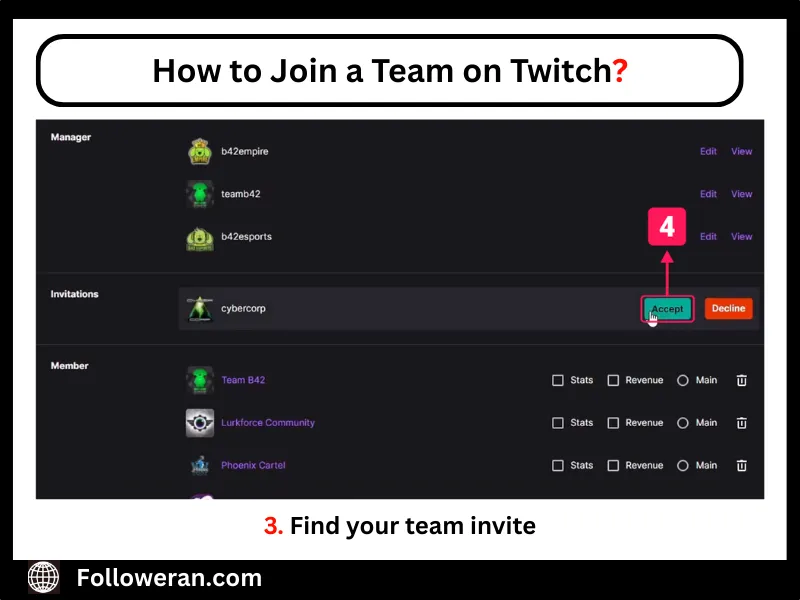
3. Accept the Invitation
If accepted, you’ll receive an invitation to join the team. To accept:
- Navigate to Your Dashboard: Log in to your Twitch account and click your profile icon in the top-right corner to access Channel Settings.
- Access Channel Settings: Go to the Featured Content tab and scroll to the My Teams section.
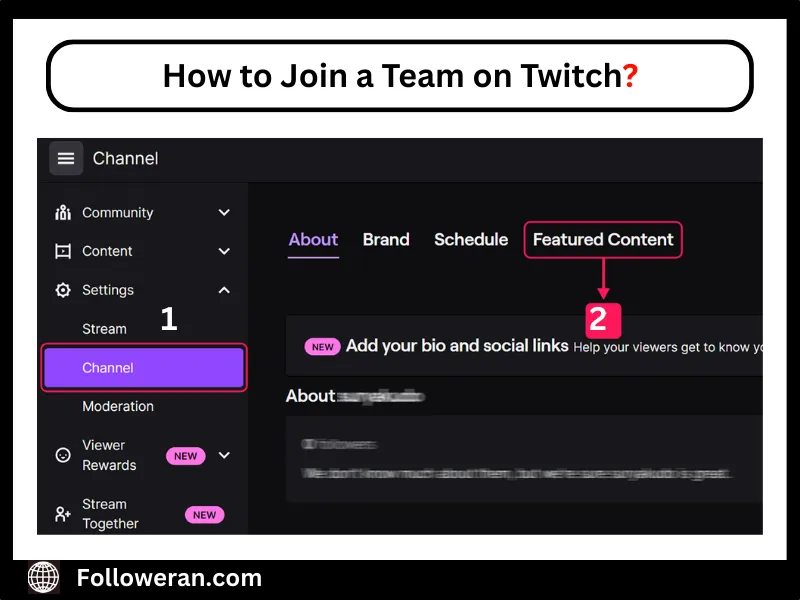
- Find the Invitation: Find your team invite, click it, and hit Accept—you’re officially part of the team!
Remember only Twitch Partners can create teams, but Affiliates and non-affiliated streamers can join, so don’t let your status deter you from trying to join a team on Twitch.
Meeting the Twitch affiliate requirements— like streaming 8 hours over 7 days, maintaining 3 concurrent viewers, and gaining 50 followers— boosts your appeal when you join a team on Twitch. These milestones show teams you’re committed and can monetize, making you a valuable member.
Types of Twitch Teams to Consider Joining
There are several types of Twitch teams you can consider joining, depending on your goals and content style:
- Community-based teams focus on shared interests like gaming genres, art, or music.
- Competitive or eSports teams bring together skilled players who participate in tournaments or ranked gameplay.
- Support-focused teams are built to help smaller streamers grow through mentorship and cross-promotion.
- Brand-sponsored teams often include creators who align with a company’s image and receive sponsorship perks.
- Collaboration-driven teams focus on co-streaming and event planning to create joint content and boost exposure for everyone involved.
Best Practices After You Join a Team on Twitch
Once you join a team on Twitch, maximize the experience:
- Be Active: Stream regularly, host teammates, and join team events to stay visible.
- Collaborate: Propose co-streams or joint projects to create engaging content.
- Engage on Socials: Share team posts or hype teammates’ streams on Twitter or Discord.
- Give Back: Offer tips to newer members to strengthen the team.
- Respect Rules: Follow team guidelines, like raid etiquette, to maintain harmony.
Conclusion
Joining a team on Twitch helps streamers grow faster by offering support, shared audiences, and collaboration opportunities. To get started, find a team that matches your content, reach out, and accept the invite through your channel settings. While only Partners can create teams, anyone can join, making it a smart move for streamers looking to boost exposure and build community.
FAQs
How do I find a Twitch team to join?
Explore Twitch streamers’ profiles, social media platforms like Twitter or Reddit, and Twitch-related Discord communities to discover teams seeking new members.
Can I join multiple Twitch teams?
Yes, you can join multiple teams, but only one can be set as your primary team, which will be featured on your channel.
Do I need to be a Twitch Affiliate or Partner to join a team?
No, any streamer can join a team; however, only Twitch Partners have the privilege to create and manage teams.
How do I accept a team invitation on Twitch?
Navigate to your Channel Settings, click on the Featured Content tab, scroll to the My Teams section, and accept the pending invitation.
Can I leave a Twitch team if it doesn’t suit me?
Yes, you can leave a team by going to your Channel Settings, selecting the My Teams section, and choosing the option to remove yourself from the team.