

Instagram prioritizes user privacy, which means that while you can see how many times your post has been shared, you can’t see who shared your Instagram post. This applies to both posts and reels. However, there are methods to gain insights into how your content is being shared.
In this article, we’ll discuss how to see who shared your Instagram reel and post and explain how to see who shared your Instagram post on iOS. Whether you’re a creator, business owner, or just curious about who’s spreading your content, we’ll walk you through the most accurate and safe ways to track this engagement.
Note: If you want to increase your chances of being shared and seen by more users, using strategic engagement tools can help. One effective method is to buy Instagram mentions, which can boost visibility, attract real attention, and naturally encourage more shares and interactions with your content.
How to See Who Shared Your Instagram Post?
If you want to know how to see who shared your Instagram reel or any post first you need to switch to a Business or Creator account and then due to the settings in business accounts, go to the share section:
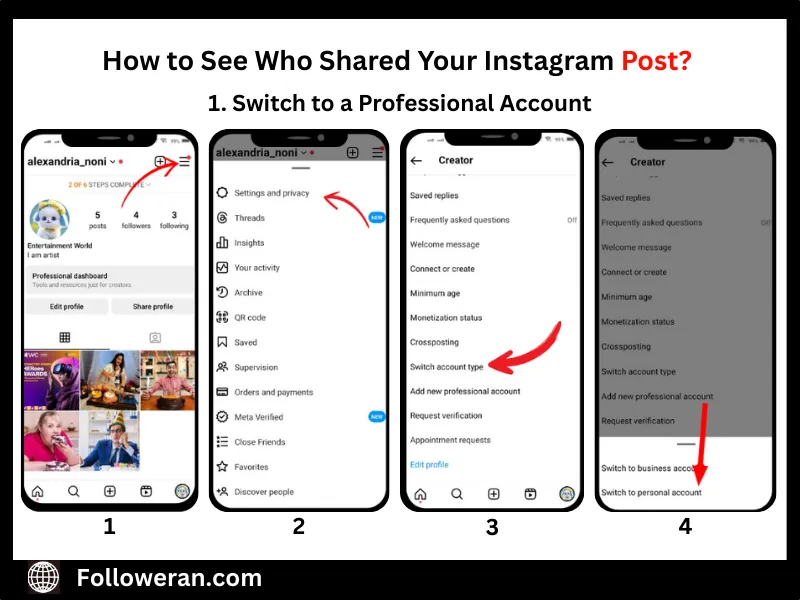
1. Switch to a Professional Account
- Go to your profile and tap the three horizontal lines in the top-right corner.
- Select Settings and Privacy.
- Tap Account type and tools.
- Choose Switch to a professional account and follow the prompts.
This change will allow you to access Instagram Insights, which provides data on how your posts are performing, including the number of shares.
2. Use Instagram Insights
Once you have a professional account:
- Navigate to the post you’re interested in.
- Tap View Insights below the post.
Find the paper airplane symbol—this represents how many times your post has been shared by others.
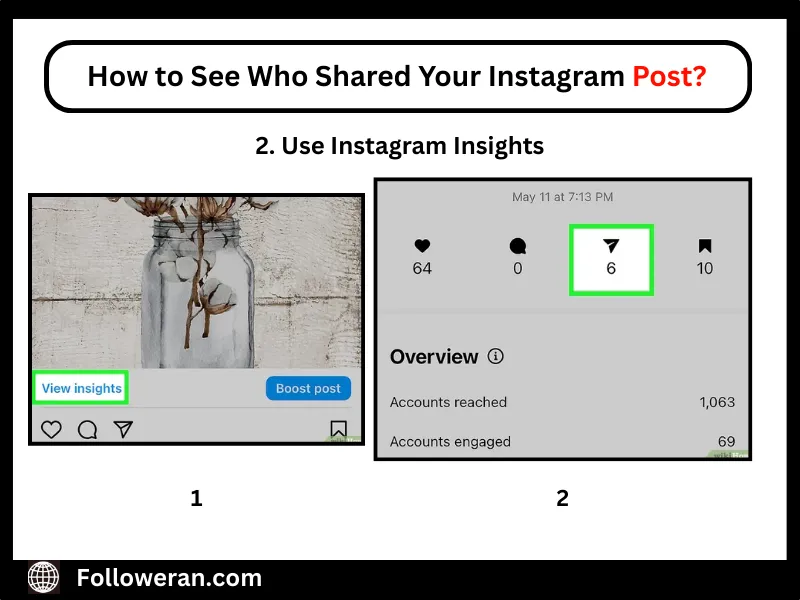
While this doesn’t show who shared your post, it gives you an idea of its reach and engagement.
How to See Who Shared My Post on Instagram Story?
If a user with a public account shares your post to their Instagram Story, you can check it by following this steps:
- Tap the three-dot menu in the upper-right corner of your post. This allows you to access additional options, including viewing active story reshares if available.
- Select View Story Reshares.
You’ll see a list of current public reshares of your post.
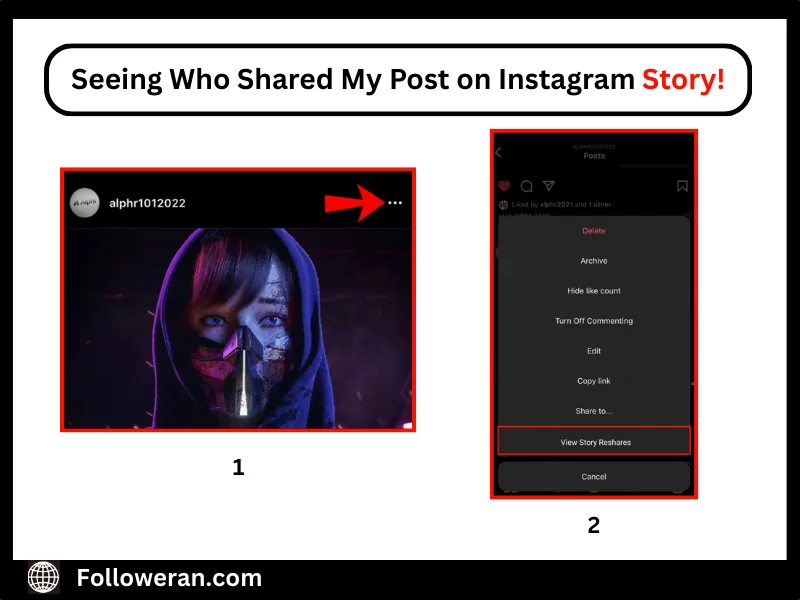
Now you can see who shared your Instagram post and this feature is only available if your post has been reshared to Stories within the last 24 hours.
To encourage more people to share your content, focus on boosting engagement through comments and interactions. A great way to do this is to buy Instagram comments to spark conversations, increase visibility, and make your posts more share-worthy.
Why Can’t I See Who Shared My Post on Instagram?
If you’re wondering why you can’t see who shared your post on Instagram, the answer lies in the platform’s strict privacy policy. Instagram does not reveal the identities of users who share your posts, especially when the content is shared via Direct Messages or by private accounts. This means that even if your post has been shared multiple times, you’ll only see a share count in your insights—not the usernames behind those shares.

There are a few more reasons this happens:
- Your account isn’t set to Professional (Business or Creator), so you don’t have access to Instagram Insights where share metrics are shown.
- The post hasn’t been reshared publicly to Stories, or the 24-hour window for viewing reshares has already passed.
To boost your chances of getting noticed and shared by a wider audience, focus on creating content that can appear on Instagram’s Explore page. The more engaging and relevant your posts are, the higher the likelihood they’ll reach users beyond your followers. One effective strategy is to buy Instagram explore services, which help boost visibility, attract organic engagement, and make your posts more likely to be reshared by a wider audience.
How to See Who Shared Your Post in a Private Account?
If your Instagram account is set to private, you can still track how many times your post was shared, but with some limitations. If someone shared your post to their Story and tagged you, you’ll get a notification—even if they’re private.

Why Should You Avoid Third-Party Tools to See Who Shared Your Post?
While it might be tempting to use third-party apps that promise to show exactly who shared your Instagram post, doing so can put your account at serious risk. These tools often violate Instagram’s terms of service, which could lead to account suspension, shadowbanning, or even permanent bans.
Many of these apps ask for your login credentials, putting your privacy and security in jeopardy by exposing sensitive information to unauthorized sources.
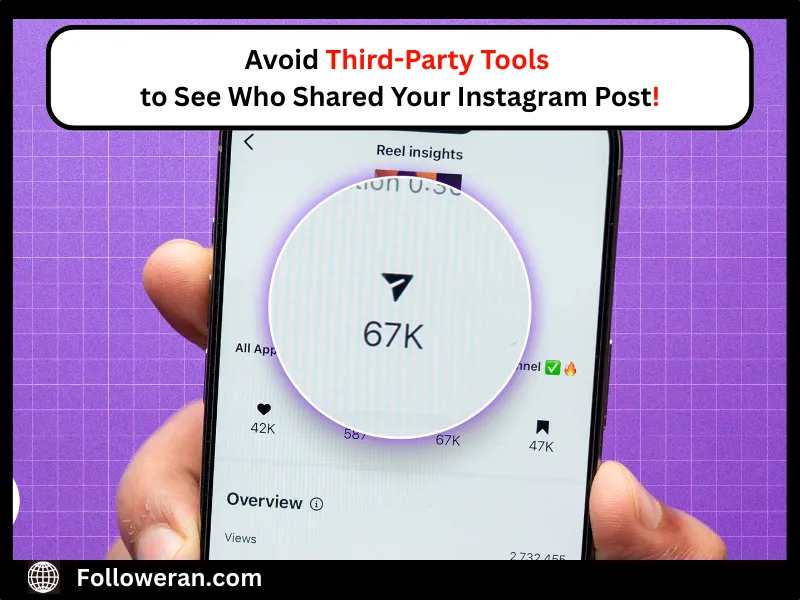
If you’re wondering how to see who shared your post, the truth is that there is no legitimate third-party tool that can provide that information. Instagram does not share this data with external apps, meaning any tool that claims otherwise is likely misleading or unsafe.
Moreover, third-party tools usually don’t have access to Instagram’s internal data, so any insights they claim to provide are either inaccurate or completely fabricated. Instagram’s API does not allow outside apps to reveal who shared a post via direct messages or private stories, meaning these tools simply can’t deliver what they promise.
Summary; See who Shared Your Instagram Post
In conclusion, while Instagram doesn’t reveal exactly who shared your posts or reels, switching to a professional account and using built-in tools like Insights and Story Reshares can help you track shared activity safely. Whether you’re learning how to see who shared your Instagram post or looking for ways to increase shares, focusing on genuine engagement strategies is key. Avoid third-party tools that risk your account, and instead use smart growth methods to boost your visibility and reach organically.
FAQs About Who Shared Your Posts on Instagram
1. Can I see who shared my Instagram post?
No, Instagram does not provide a feature to see the specific users who have shared your post.
2. How can I see how many times my post was shared?
By switching to a Business or Creator account, you can access Instagram Insights, which show the number of times your post has been shared.
3. Can I see who shared my post to their Instagram Story?
If someone with a public account shares your post to their Story, you can view this by tapping the three dots on your post and selecting “View Story Reshares” within 24 hours of the share.
4. Will I be notified if someone shares my post?
Instagram does not send notifications when someone shares your post, unless they tag you in their Story.
5. Can I see who shared my Instagram Reel?
Similar to posts, you can view the number of shares for your Reels through Insights, but not the identities of the users who shared them.
6. Are there any third-party apps that can show me who shared my post?
No, using third-party apps to access this information is against Instagram’s terms of service and can compromise your account’s security.
7. Why is the “View Story Reshares” option not available on my post?
This option only appears if your post has been reshared to Stories by public accounts within the last 24 hours.